
Quick Answer
A KiCad schematic generator should turn a product-level prompt into an editable KiCad project, not just a static circuit image. The useful output includes schematic sheets, named nets, a system architecture, BOM context, symbols, footprints, and enough structure for an engineer to review the design in KiCad.
SpeedUp’s AI KiCad schematic generator is built around that workflow: describe the device, generate a KiCad draft, then review and refine the project before layout or manufacturing. Treat the result as a reviewable first draft, not an automatic production release.
Why This Matters
The hardest part of early hardware design is often not drawing the first symbol. It is translating a product idea into an electrical architecture that can survive engineering review.
A product prompt such as "make a small battery-powered BLE recorder" contains many hidden decisions: battery chemistry, charger, rails, microphone interface, storage, wireless sync, antenna constraints, firmware update path, debug access, mechanical limits, and sourcing risk. If the first schematic draft does not expose those assumptions, the team still has to rediscover them by hand.
That is why a good KiCad schematic generator should create editable design artifacts. KiCad’s schematic editor workflow is built around schematic capture, ERC, footprint assignment, BOM generation, netlists, and transfer to PCB layout. A generated project only becomes useful when it fits into that real KiCad review flow.
Product Prompt to KiCad Project Workflow
| Step | What the generator should produce | What the engineer reviews |
|---|---|---|
| Product prompt | Device purpose, constraints, preferred parts, power source, interfaces, output format | Whether the prompt describes a buildable device instead of a vague feature list |
| Architecture | Functional blocks such as power, MCU, sensors, storage, RF, connectors, and protection | Whether the block diagram matches the product behavior and physical constraints |
| KiCad schematic sheets | Editable schematic hierarchy with named nets, labels, symbols, and subsystem pages | Whether rails, interfaces, pullups, protection, boot, debug, and signal names are plausible |
| BOM context | Main ICs, passives, protection devices, connectors, and package assumptions | Whether parts are available, correctly rated, and matched to footprints |
| KiCad handoff | Project files that can be opened, inspected, annotated, and modified in KiCad | Whether the project is ready for ERC, footprint review, layout planning, and prototype decisions |
Have a hardware product brief ready?
Describe the device behavior, power sources, required interfaces, preferred components, connectors, operating states, and constraints. Create a free account to start a reviewable, editable KiCad first draft.
The point is not to skip engineering. The point is to move from "someone should start a schematic" to a concrete KiCad package that can be reviewed line by line.
What to Put in the Product Prompt
Weak prompt:
Design a BLE recorder.
Better prompt:
Design a compact battery-powered BLE audio recorder with a PDM microphone, local flash storage, USB-C charging, one user button, status LEDs, SWD programming, a 2.4 GHz antenna, low-power sleep, and a KiCad project organized by power, MCU, audio, storage, RF, UI, and connectors.
| Prompt detail | Why it matters |
|---|---|
| Device purpose | Keeps the schematic tied to product behavior, not abstract circuit blocks |
| Power source and battery | Drives charger choice, protection, rail generation, sleep current, and thermal review |
| Main IC or preferred family | Reduces wrong-part drift and helps the generator choose support circuitry |
| Interfaces | Defines pullups, voltage domains, connectors, ESD, and firmware assumptions |
| Mechanical constraints | Affects connector placement, antenna choice, battery size, and board-level risk |
| Expected output | Makes it clear that you want editable KiCad files, not only a diagram |
Example From a Real SpeedUp Project
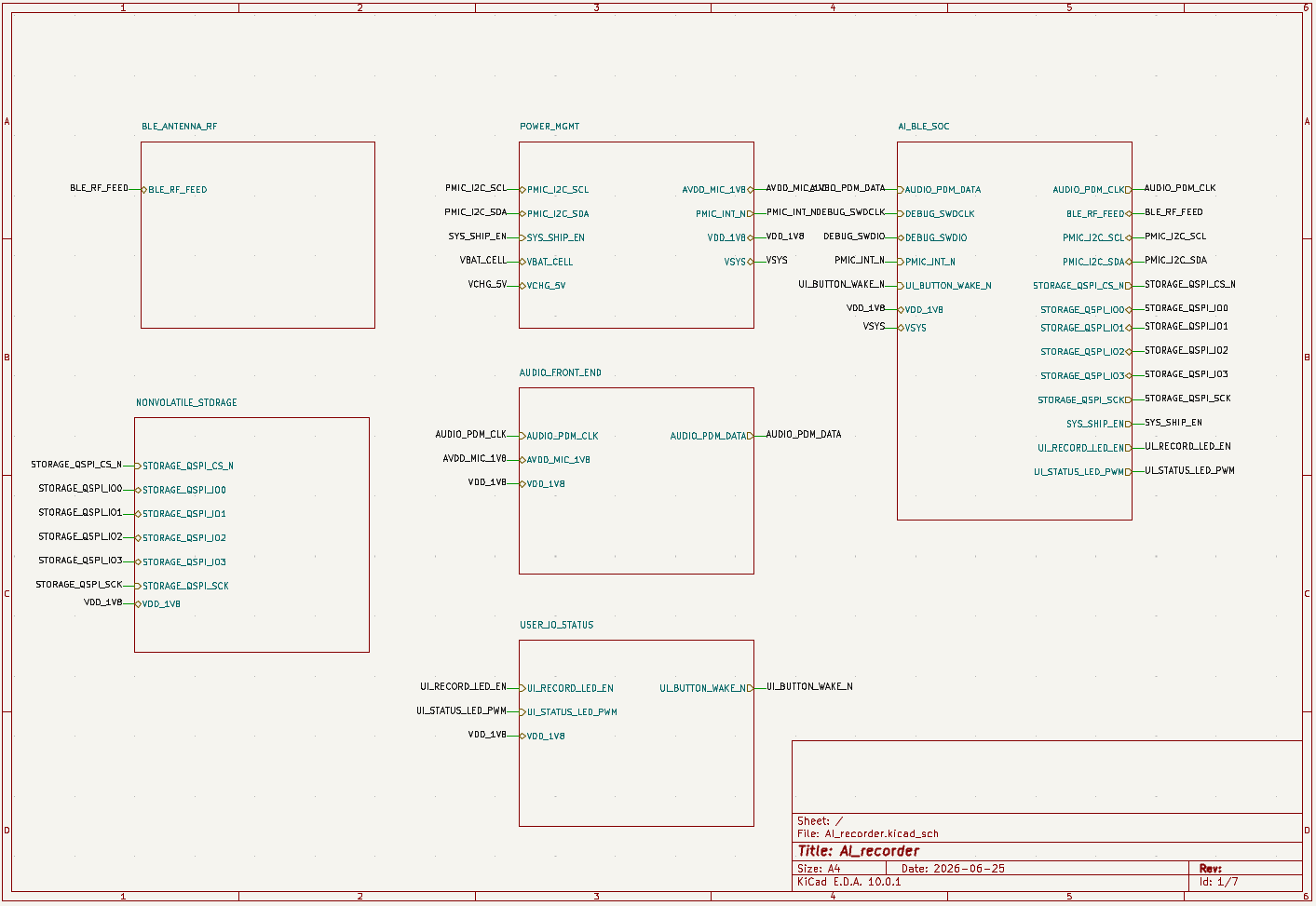
This workflow is easiest to see in the magnetic AI label microphone KiCad project. The prompt asked for a tiny magnetic voice recorder that records continuously, supports phone sync over BLE, and fits into a compact product form factor.
SpeedUp generated a KiCad-oriented design package with separate blocks for power management, BLE SoC, audio front end, flash storage, RF antenna, user input, status output, and connectors.

For this kind of product, the generated schematic is useful because the reviewer can inspect specific assumptions:
- Does the charger match the battery and enclosure thermal limits?
- Does the 1.8 V rail cover the BLE SoC, storage, microphone, and UI loads?
- Are PDM audio signals, QSPI storage signals, PMIC interrupts, and RF feed nets named clearly?
- Are debug, reset, boot, firmware update, and production lock assumptions visible?
- Does the RF section include antenna keepout and tuning placeholders that still need real validation?
Those are exactly the questions a blank schematic delays. A generated KiCad project gives the team something concrete to accept, reject, or modify.
What Engineers Should Review Before Layout
| Review area | Questions to ask before layout |
|---|---|
| Power tree | Are input protection, charger, load switches, regulators, decoupling, and power states correctly sized? |
| MCU and firmware | Are boot pins, reset, clocks, debug, programming, firmware update, and sleep assumptions represented? |
| Interfaces | Are I2C, SPI, UART, USB, PDM, ADC, GPIO, and connector voltage domains clear? |
| BOM and footprints | Are packages, availability, ratings, alternates, and footprint mappings realistic? |
| RF and analog | Are antenna, matching, microphone, sensing, noise, grounding, and placement constraints called out? |
| KiCad project hygiene | Are sheets organized, net names readable, symbols editable, footprints assigned, and ERC issues reviewable? |
For a deeper checklist, use the AI-generated KiCad schematic review guide after the first project is generated.
Common Mistakes
- Asking for a "schematic" when you really need an editable KiCad project.
- Treating a generated diagram as evidence that the electrical design is complete.
- Leaving the prompt vague about battery, charging, connectors, communications, and mechanical constraints.
- Skipping BOM and footprint review because the schematic looks organized.
- Moving to PCB layout before ERC, power, firmware, RF, sourcing, and compliance assumptions have been checked.
How SpeedUp Fits
SpeedUp is useful when you know the product you want but do not want the first KiCad session to start from an empty sheet. It turns product behavior into a structured circuit draft: architecture, schematic sheets, BOM context, and editable KiCad project files.
That makes it different from a generic circuit diagram generator. The output is meant to continue into engineering review, not stop as a nice-looking image. If you need a broader overview of the category, read the AI circuit schematic generator guide. If you are ready to generate a KiCad-focused draft, start with the AI KiCad schematic generator.
Related Project Examples
- Magnetic AI label microphone KiCad project – a BLE audio recorder example with power, RF, audio, storage, and firmware review points.
- nRF54L15 development board KiCad project – a development-board example for MCU, connectors, debug, and bring-up planning.
- Desktop robot ESP32 KiCad project generated from a prompt – a richer product example with MCU, motor, power, sensing, and reviewable KiCad project evidence.
FAQ
Can AI generate a real KiCad schematic?
Yes. AI can generate a useful first KiCad schematic draft when the prompt includes enough product and engineering detail. The output still needs human review for electrical correctness, footprints, layout constraints, sourcing, safety, test planning, and manufacturing readiness.
What should a KiCad schematic generator output?
It should output editable KiCad project files, schematic sheets, symbol and footprint context, named nets, a BOM, and enough documentation for review. A PNG or PDF alone is not enough for engineering work.
Is a generated KiCad project production-ready?
No. Treat it as a reviewable first draft. Engineers still need to run checks, validate component choices, inspect footprints, confirm datasheets, review layout constraints, test prototypes, and handle compliance or safety requirements.
What prompt details improve the generated schematic?
Include the device purpose, power source, required voltage rails, battery or charger needs, preferred ICs, sensors, communication interfaces, connectors, mechanical limits, debug/programming needs, and the fact that you want an editable KiCad project.
What happens after opening the project in KiCad?
Review the schematic hierarchy, run ERC, inspect footprints, check the BOM, verify power and interface assumptions, add missing constraints, and then decide whether the project is ready for PCB layout or another schematic revision.
Turn Your Product Prompt Into KiCad
Move from a product brief to structured schematic sheets and an editable KiCad project.
Use SpeedUp to turn the product requirements into structured schematic sheets and an editable KiCad first draft for engineering review. Create a free account to begin.