
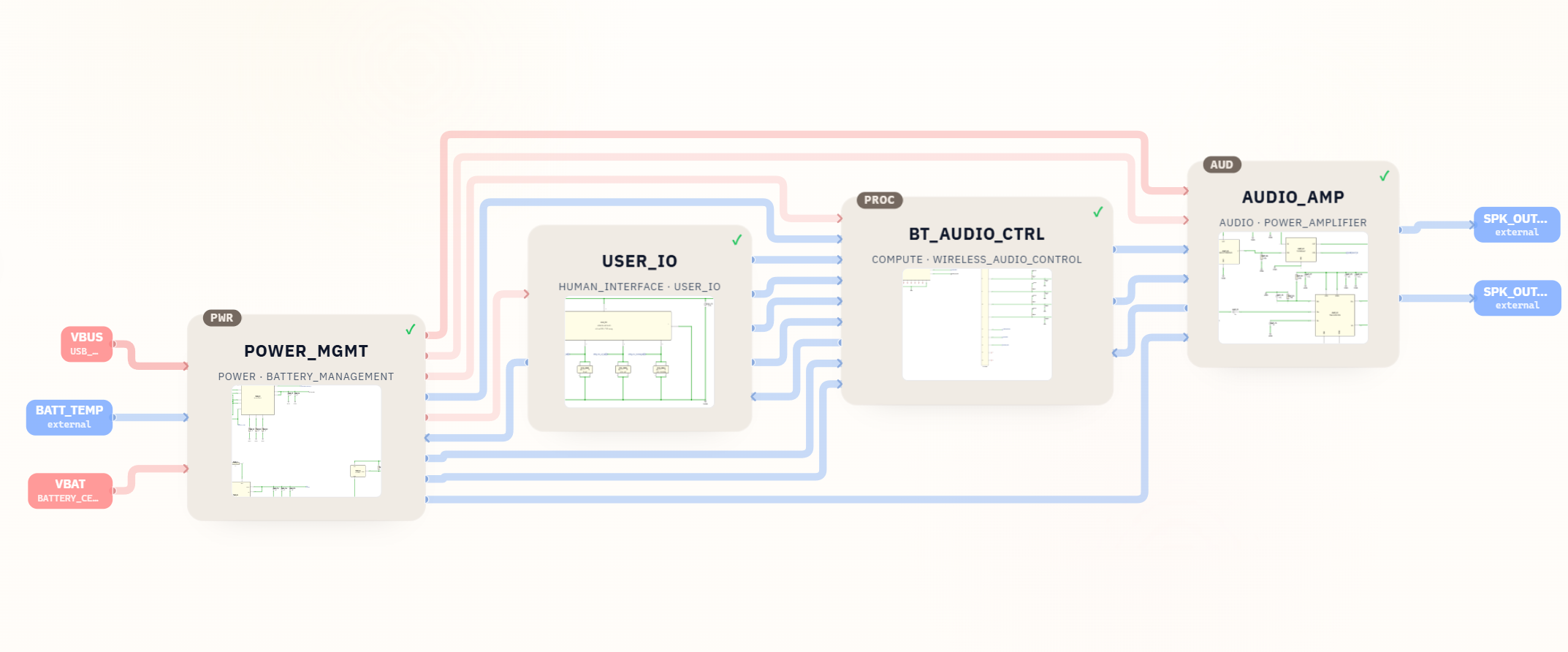
This project shows how SpeedUp turned a short product request into a reviewable portable Bluetooth speaker schematic package. The generated output includes a system block diagram, a top-level schematic screenshot, power-management circuitry, Bluetooth audio control, user-control wiring, an audio amplifier stage, and a downloadable screenshot bundle for engineering review.
This is a first engineering draft for review, not a production-ready reference design.
Project Summary
| Field | Details |
|---|---|
| Project | Low-cost portable Bluetooth speaker |
| Input | Natural-language product prompt |
| Output | Schematic screenshot package |
| Key modules | POWER_MGMT, USER_IO, BT_AUDIO_CTRL, AUDIO_AMP |
| Included files | Prompt screenshot, architecture block diagram, top-level schematic screenshot, subsystem schematic screenshots, source ZIP bundle |
| Missing from ZIP | Editable KiCad source files, BOM file, PCB layout, firmware, enclosure files, acoustic validation data |
| Status | First engineering draft for review |
The Prompt
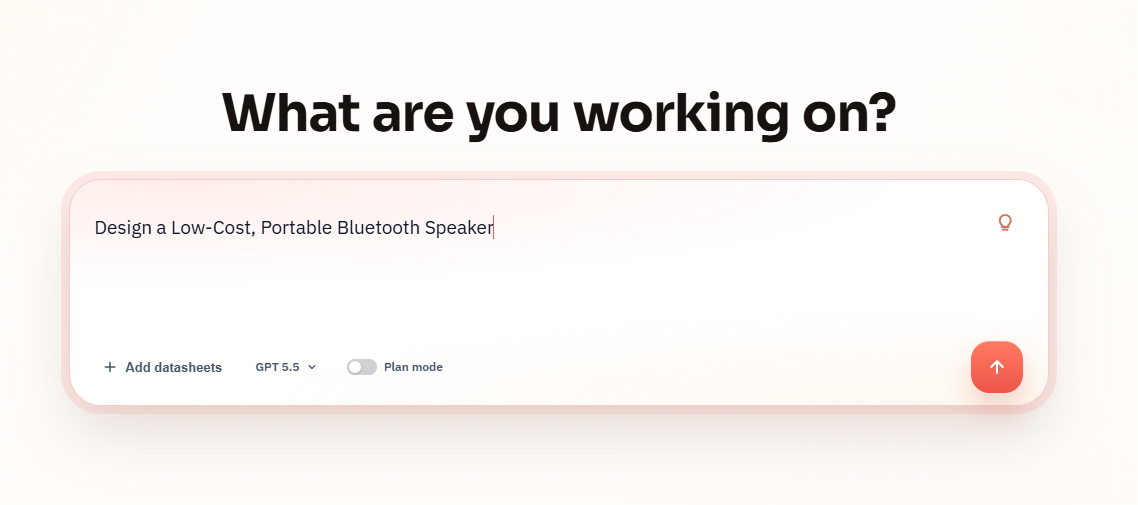
The project starts with a plain-language device request:
Design a Low-Cost, Portable Bluetooth Speaker
What SpeedUp Generated
SpeedUp turned the prompt into a structured speaker design package with:
- A system block diagram for the portable Bluetooth speaker architecture.
- A top-level schematic screenshot titled
speaker, with hierarchical blocks for power, user IO, Bluetooth audio control, and audio amplification. - A
POWER_MGMTschematic showing USB input, battery input, charge status, battery temperature, battery-level sensing, power-good/reset behavior, and regulated supply rails. - A
BT_AUDIO_CTRLschematic centered around anHLK-B40Bluetooth audio module with antenna, audio mono output, button inputs, battery ADC, charge status, amplifier enable, and status LED signals. - An
AUDIO_AMPschematic with amplifier enable/fault logic, input filtering, a power-switch stage, aTPA2011D1YFFRamplifier, speaker-output protection components, and a 2-pin speaker connector. - Supporting crops from the architecture view for each major module.
- A downloadable source bundle containing the generated screenshots.
Want to create a portable Bluetooth speaker?
Describe your own portable Bluetooth speaker requirements and create a free account to start a reviewable engineering draft.
Project Architecture
The architecture is organized around four reviewable modules. The theme-rendered featured image above this article shows the full block diagram, including the signal flow from power input and battery through Bluetooth control and the audio amplifier to the external speaker outputs.
POWER_MGMT: Handles USB/VBUS input, battery input, battery temperature, charge status, battery-level feedback, 3.3 V logic power, and system power-good behavior.USER_IO: Carries the speaker's human-interface signals, including power, play, volume up, volume down, and status LED control.BT_AUDIO_CTRL: Provides the Bluetooth audio/control core and connects wireless audio, buttons, battery ADC, charge status, amplifier enable, and status LED signals.AUDIO_AMP: Receives mono audio, waits for enable/power-good conditions, drives the speaker output pair, and exposes amplifier fault feedback.
Low-Cost Portable Bluetooth Speaker Schematic Output
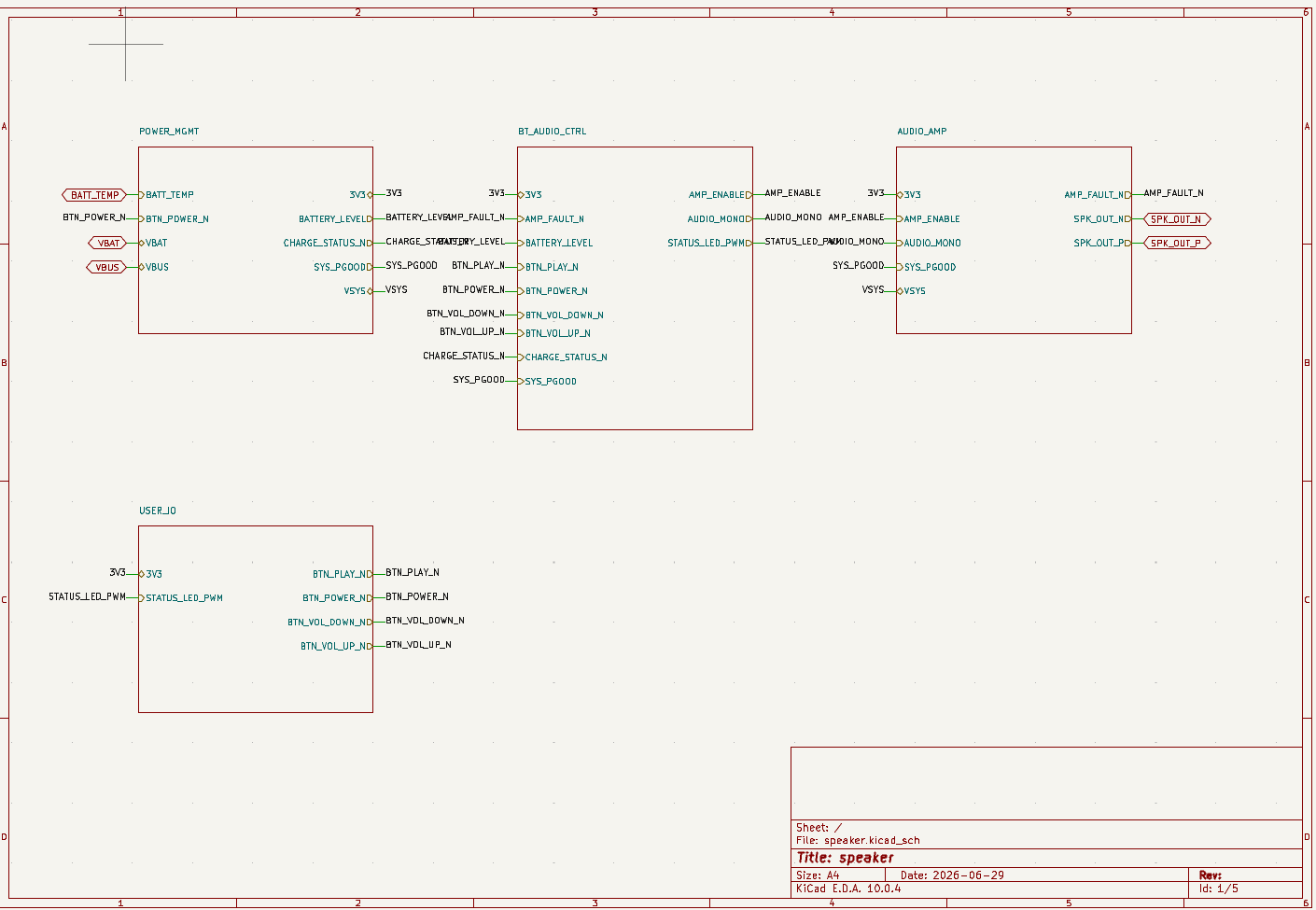
The top-level sheet is useful because it separates product-level design intent from implementation detail. Instead of presenting one flat circuit, the generated schematic divides the portable speaker into power, controls, Bluetooth audio, and speaker-drive sections. That makes it easier for an engineer to review one subsystem at a time.
The ZIP supplied for this article contains screenshots rather than editable KiCad source files. The title block in the screenshot references speaker.kicad_sch, but the actual .kicad_sch file was not present in the provided ZIP.
Power Management Detail
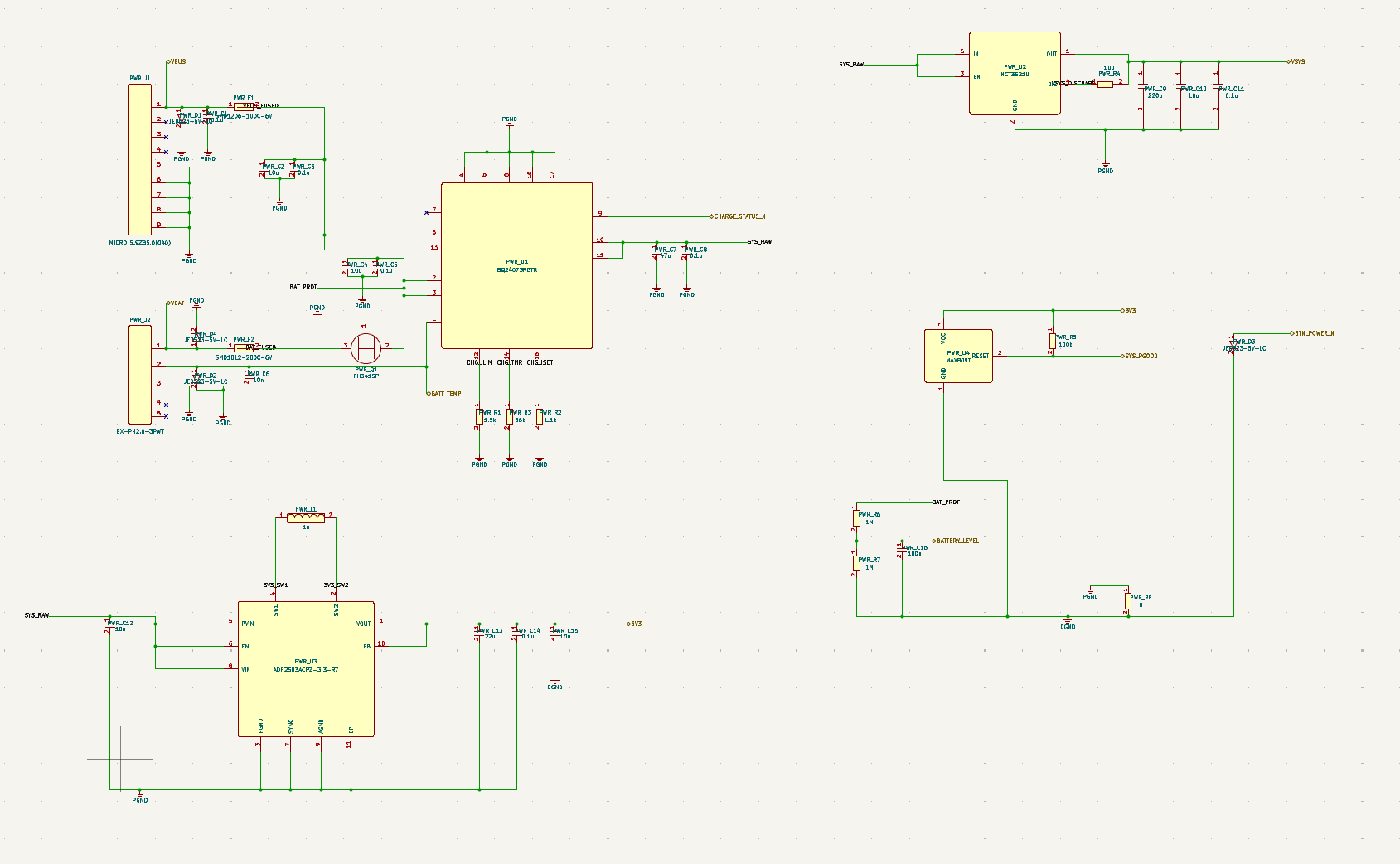
For a low-cost portable Bluetooth speaker, the power section is one of the highest-risk parts of the design. It has to accept USB power, manage a rechargeable battery, expose battery temperature and voltage feedback, and supply both logic and speaker-related rails without making the audio path noisy.
This part of the design should be reviewed for charger configuration, input protection, battery connector assumptions, thermal behavior, power-path behavior while charging and playing audio, regulator current limits, grounding, and the separation between power ground, digital ground, and audio ground.
Bluetooth Audio Control Detail
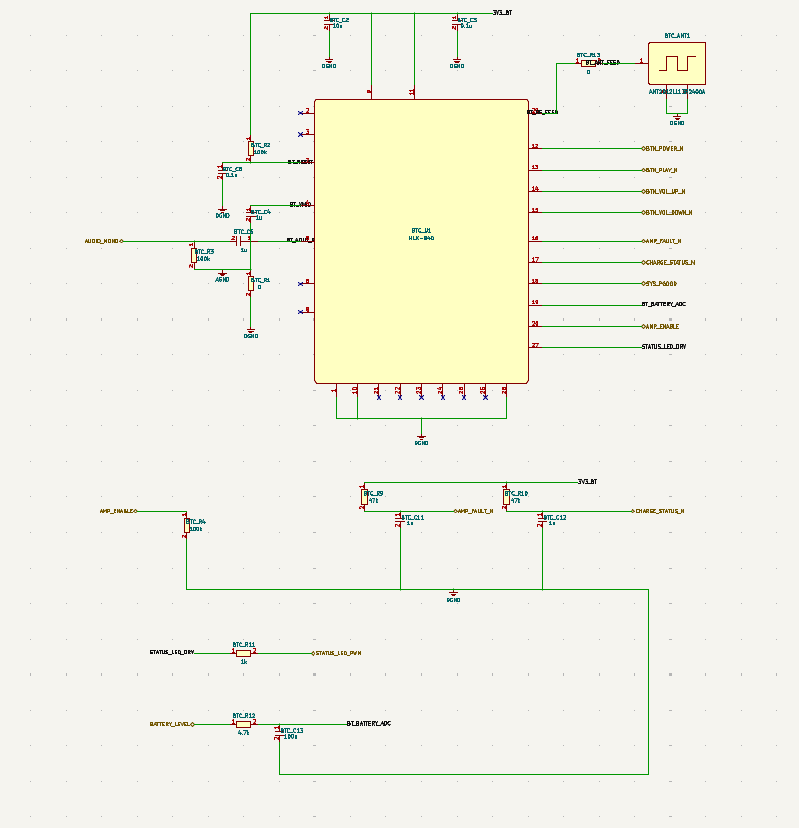
The Bluetooth audio-control block is the bridge between user behavior and the analog speaker path. It receives button inputs, monitors battery-related signals, outputs mono audio, and controls whether the amplifier should be enabled.
For review, this sheet needs attention around antenna matching and placement, module supply decoupling, audio-output biasing, ADC range for battery sensing, active-low button conventions, ESD protection on external controls, and firmware or module behavior for pairing, volume state, low-battery handling, and shutdown.
Audio Amplifier Detail
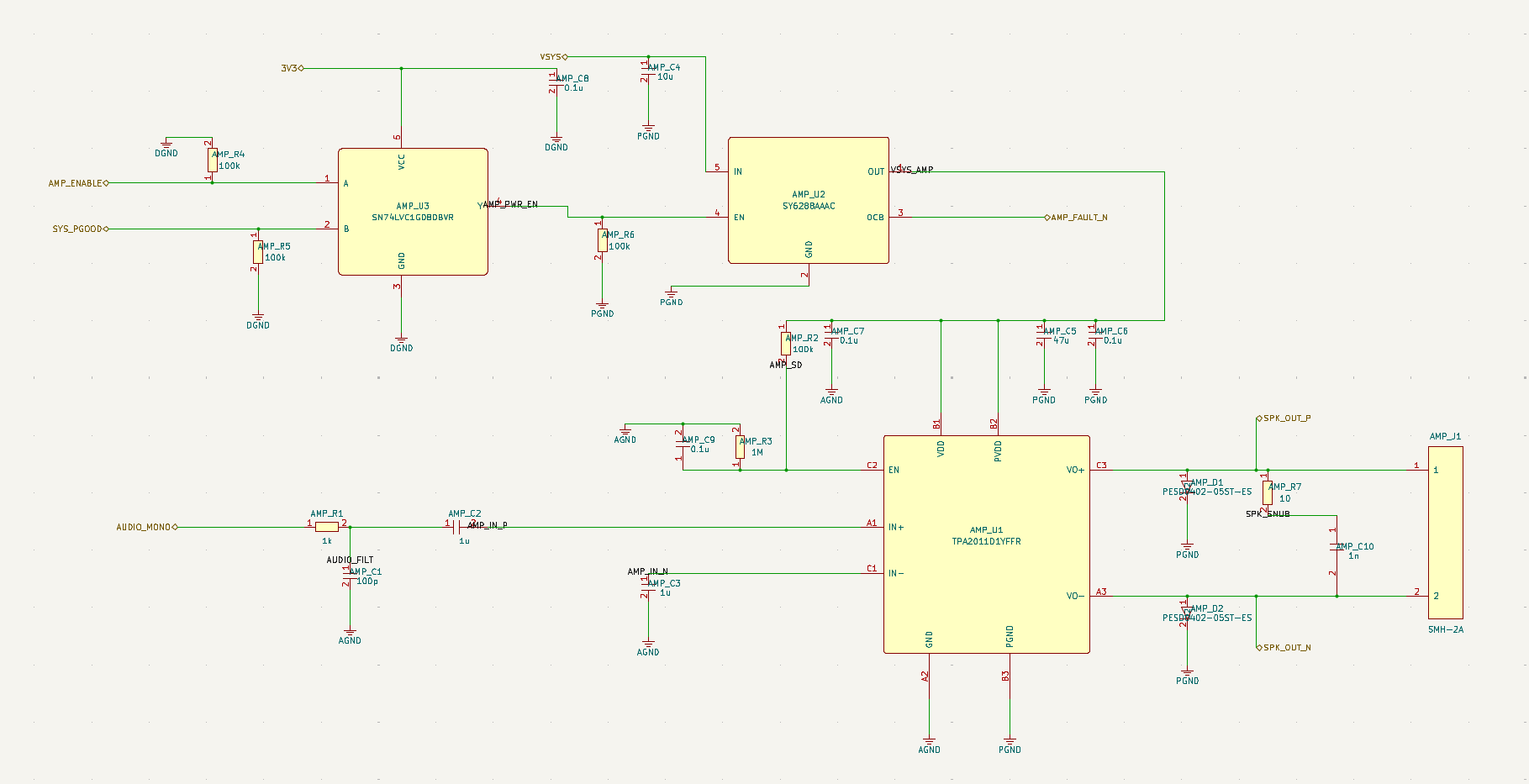
The amplifier section turns the Bluetooth module's mono audio signal into the speaker output. The generated sheet includes enable logic tied to amplifier enable and system power-good, supply switching, input filtering, amplifier decoupling, output protection parts, and a 2-pin speaker connector.
This area should be checked for speaker impedance, expected output power, battery-voltage sag under load, EMI from the class-D amplifier, audio pop/click behavior during startup, output filter assumptions, connector current rating, and whether the selected amplifier matches the speaker and enclosure target.
BOM Preview
No BOM file was detected in the provided ZIP, so this article should not be treated as a component-sourcing handoff.
The schematic screenshots do show representative component choices and design intent, including the HLK-B40 Bluetooth audio module, TPA2011D1YFFR amplifier, USB/battery input connectors, protection components, passives, regulator stages, and speaker-output connector. Before layout, an engineer should generate or export a real BOM, confirm part availability, validate footprints, and decide which parts are preferred, alternate, or placeholder.
What Still Needs Human Review
This generated portable speaker project is a useful first draft, but it still needs engineering review before PCB layout or production. Priority checks include:
- Battery charging behavior, battery protection assumptions, charge current, thermistor range, and safe operation while charging and playing.
- Power-rail noise, regulator current margin, ground partitioning, and decoupling for the Bluetooth and amplifier sections.
- Bluetooth antenna placement, matching, enclosure detuning, and RF compliance.
- Speaker impedance, amplifier output power, thermal rise, EMI, and pop/click behavior.
- Button debounce, user-control polarity, status LED behavior, and firmware/module state assumptions.
- ESD protection for USB, buttons, speaker connector, battery connector, and any exposed user interfaces.
- Component availability, second-source options, package selection, and footprint/land-pattern validation.
- Mechanical constraints such as battery size, speaker driver, enclosure volume, porting, mounting holes, and connector access.
- Acoustic performance, distortion, resonance, and enclosure tuning.
- Safety, labeling, charging compliance, shipping requirements for lithium batteries, and manufacturing test points.
Related SpeedUp Projects and Guides
- AI Schematic Generator for KiCad Circuit Projects
- KiCad Schematic Generator: From Product Prompt to Editable KiCad Project
- What to Check Before Using an AI-Generated KiCad Schematic for PCB Layout
- How to Review an AI-Generated KiCad Schematic
FAQ
Is this portable Bluetooth speaker design production ready?
No. This is a first engineering draft intended for review, iteration, and validation. It shows a useful architecture and schematic direction, but it still needs electrical review, BOM generation, footprint validation, PCB layout, firmware behavior checks, acoustic design, safety review, and manufacturing planning.
What files are included in the generated package?
The provided package includes a prompt screenshot, a block diagram, a top-level schematic screenshot, subsystem schematic screenshots, and supporting architecture crops. It does not include editable KiCad source files, a BOM file, PCB layout files, firmware, or enclosure design files.
Can this be opened directly in KiCad?
Not from the ZIP supplied for this article. The screenshots reference a KiCad schematic project, but the actual editable .kicad_sch files were not included in the ZIP, so this package should be treated as a visual schematic review bundle.
What should engineers review before layout?
Engineers should review the power path, battery charging configuration, RF antenna assumptions, amplifier and speaker matching, grounding, ESD protection, component availability, footprint accuracy, and mechanical constraints. Audio products also need acoustic and EMI review before they can be treated as production candidates.
Can I generate a similar speaker project from my own prompt?
Yes. SpeedUp is designed to turn a natural-language hardware idea into structured engineering artifacts that can be reviewed and refined. A stronger prompt can request specific constraints, such as battery size, output power, USB-C charging, speaker impedance, enclosure size, target cost, and preferred Bluetooth/audio modules.
Download the Schematic Review Package
Use this ZIP as a review starting point for the generated low-cost portable Bluetooth speaker schematic package. The bundle includes the original prompt screenshot, architecture/block-diagram image, top-level schematic screenshot, subsystem schematic screenshots, and supporting module crops. It does not include editable KiCad source files, a BOM, PCB layout, firmware, enclosure CAD, acoustic validation data, or production test documentation.
Create Your Own Bluetooth Speaker Project
Turn your own portable Bluetooth speaker brief into reviewable engineering artifacts.
Use SpeedUp to generate structured schematic sheets and an editable KiCad project for engineering review. Create a free account to begin.
Comments
No comments yet.
Leave a Reply