
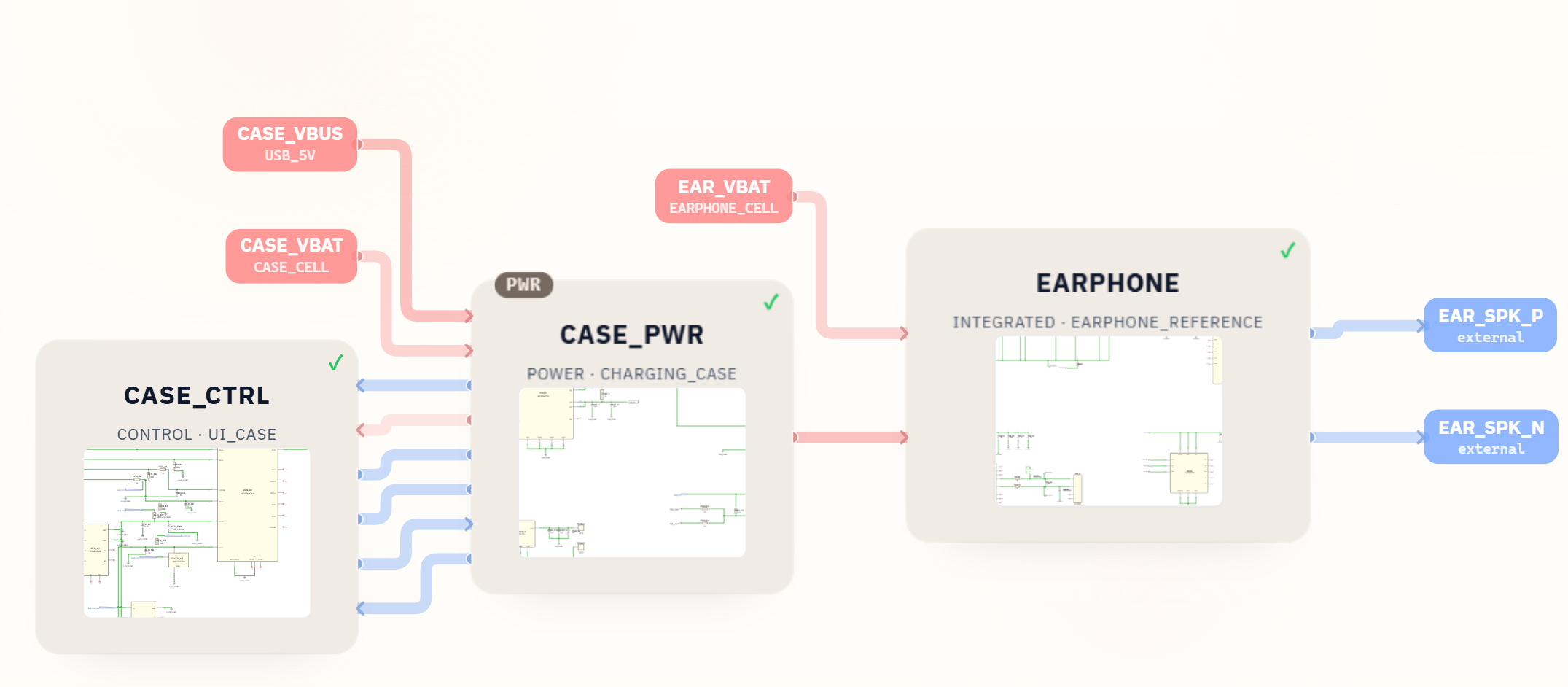
This project is a concrete AI schematic generator example: SpeedUp turned a short TWS earphones prompt into an editable KiCad project for the earbuds and charging case. The source package includes three hierarchical schematic sheets, BOM exports, local libraries, and a PCB file with component placement but no routed copper segments or vias.
The package should be treated as a first engineering draft for review, not a production-ready TWS earbuds reference design. Engineers can open TWS_earphone.kicad_pro in KiCad 10 to review and edit the charging-case power, case-control, and earphone sheets before PCB routing, firmware, acoustic, RF, mechanical, compliance, and manufacturing work.
Project Summary
| Field | Details |
|---|---|
| Project | TWS earphones with automatic noise cancellation, spatial audio, and a charging case |
| Input | Natural-language prompt |
| Output | Editable KiCad 10 project, BOM, local libraries, and a placed but unrouted PCB file |
| Key modules | CASE_PWR, CASE_CTRL, EARPHONE, charging-case battery input, earbud battery input, speaker output |
| Included files | TWS_earphone.kicad_pro, top-level and three hierarchical schematic sheets, TWS_earphone.kicad_pcb, CSV/XLSX BOM, 18 symbol libraries, 32 footprint files, and project-evidence images |
| Next engineering work | BOM and footprint review, PCB placement review and routing, firmware, production test plan, acoustic validation, and compliance review |
| Status | First engineering draft for review |
The Prompt
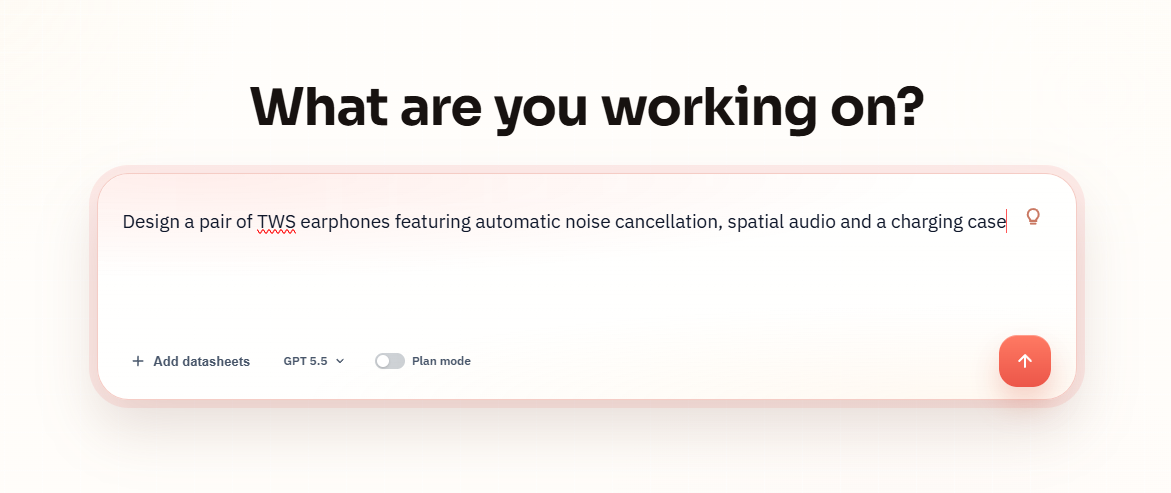
The project starts with a plain-language device request:
Design a pair of TWS earphones featuring automatic noise cancellation, spatial audio and a charging case
What SpeedUp Generated
SpeedUp turned the prompt into a structured hardware concept with:
- A system block diagram connecting the charging case, case power, case control, and earphone module.
- An editable KiCad project with
TWS_earphone.kicad_pro, a top-level schematic, andCASE_PWR,CASE_CTRL, andEARPHONEsheets. - A charging-case power schematic with USB-C input, case battery input, earbud dock power, charging status, and dock-detect signals.
- A case-control schematic with I2C, earbud charge enable/status, dock detect, LED indicators, and case-side control logic.
- An earphone schematic capture with battery/power regulation, audio/earbud controller circuitry, microphone-related nets, touch output, and speaker outputs.
- A downloadable source package containing the editable project, BOM exports, local libraries,
TWS_earphone.kicad_pcb, and project-evidence images.
Want to design TWS earbuds and a charging case?
Describe your own TWS earbuds and charging-case requirements and create a free account to start a reviewable engineering draft.
Project Architecture
The generated design separates the product into three reviewable schematic areas:
CASE_PWR: handles USB-C case input, the case battery path, the earbud dock 5V rail, case 3.3V power, charge status, and dock detection.CASE_CTRL: provides the case-side controller and UI layer, including I2C communication, ear charge enable/status lines, dock-detect input, Hall or button-related input, and red/green LED outputs.EARPHONE: represents the earbud-side electronics, including earbud battery input, power regulation, audio controller circuitry, microphone-related interfaces, touch output, and differential speaker output nets.- External ports and nets:
CASE_VBUS,CASE_VBAT,EAR_VBAT,EAR_DOCK_5V,EAR_SPK_P, andEAR_SPK_N.
This split is useful because the charging case and earbud have different review risks. The case must manage charging, battery safety, docking behavior, and user feedback; the earbud must manage compact power, audio, microphones, RF/audio SoC behavior, speaker drive, touch input, and acoustic constraints.
TWS Earbuds Schematic and Charging Case Schematic Output
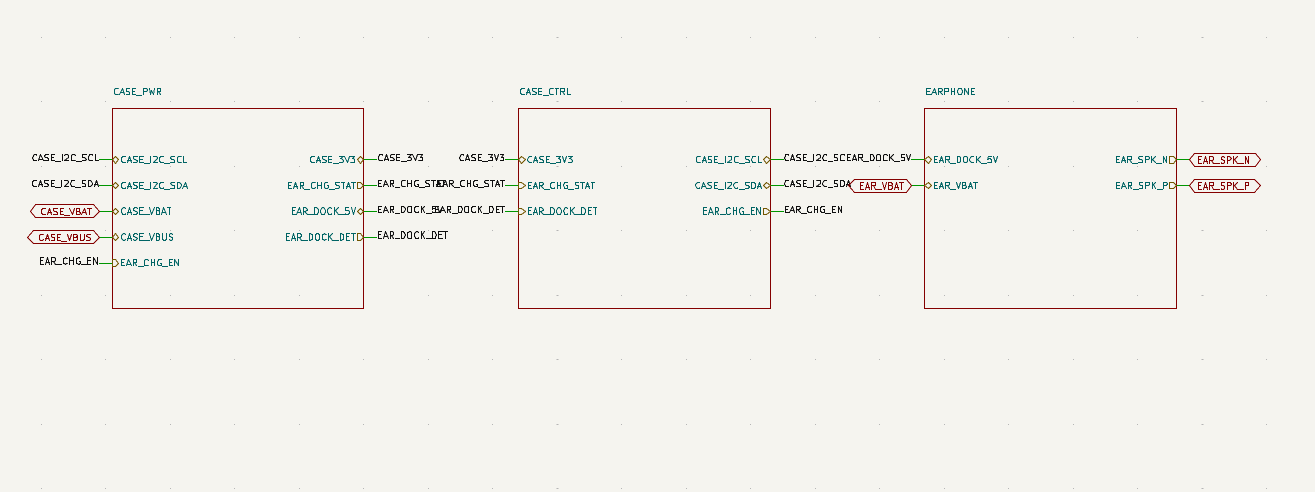
The top-level TWS_earphone.kicad_sch connects the three functional sheets and makes the main nets visible across module boundaries. The included TWS_earphone.kicad_pcb contains 156 placed footprints, matching the BOM quantity total, but it has no routed copper segments or vias.
Charging Case Power
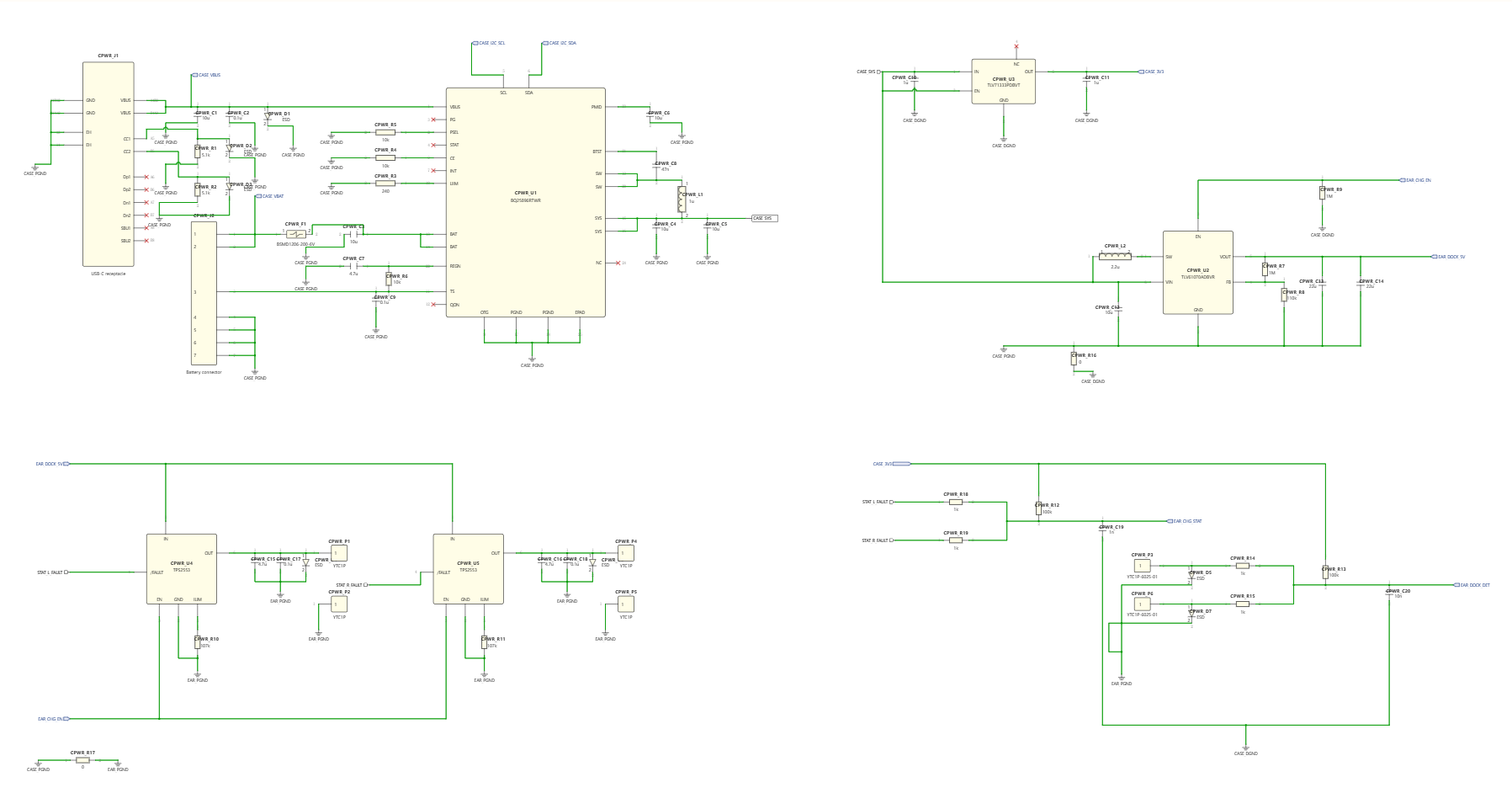
The charging case power section is the most important electrical risk area in this draft. It must support the case battery, external USB power, earbud dock charging, current limiting, charge status reporting, and safe power sequencing between the case and the earbuds.
Before this moves toward PCB layout, an engineer should review:
- Battery charger configuration, charge current, termination behavior, and thermal assumptions.
- USB-C input protection, ESD protection, connector orientation, and VBUS fault handling.
- Earbud dock 5V rail behavior during insertion, removal, short circuit, and low case-battery conditions.
- Power-path interactions between case battery, dock power, and case logic rails.
- Grounding, return-current paths, and separation between charging currents and sensitive audio circuits.
Case Control and UI
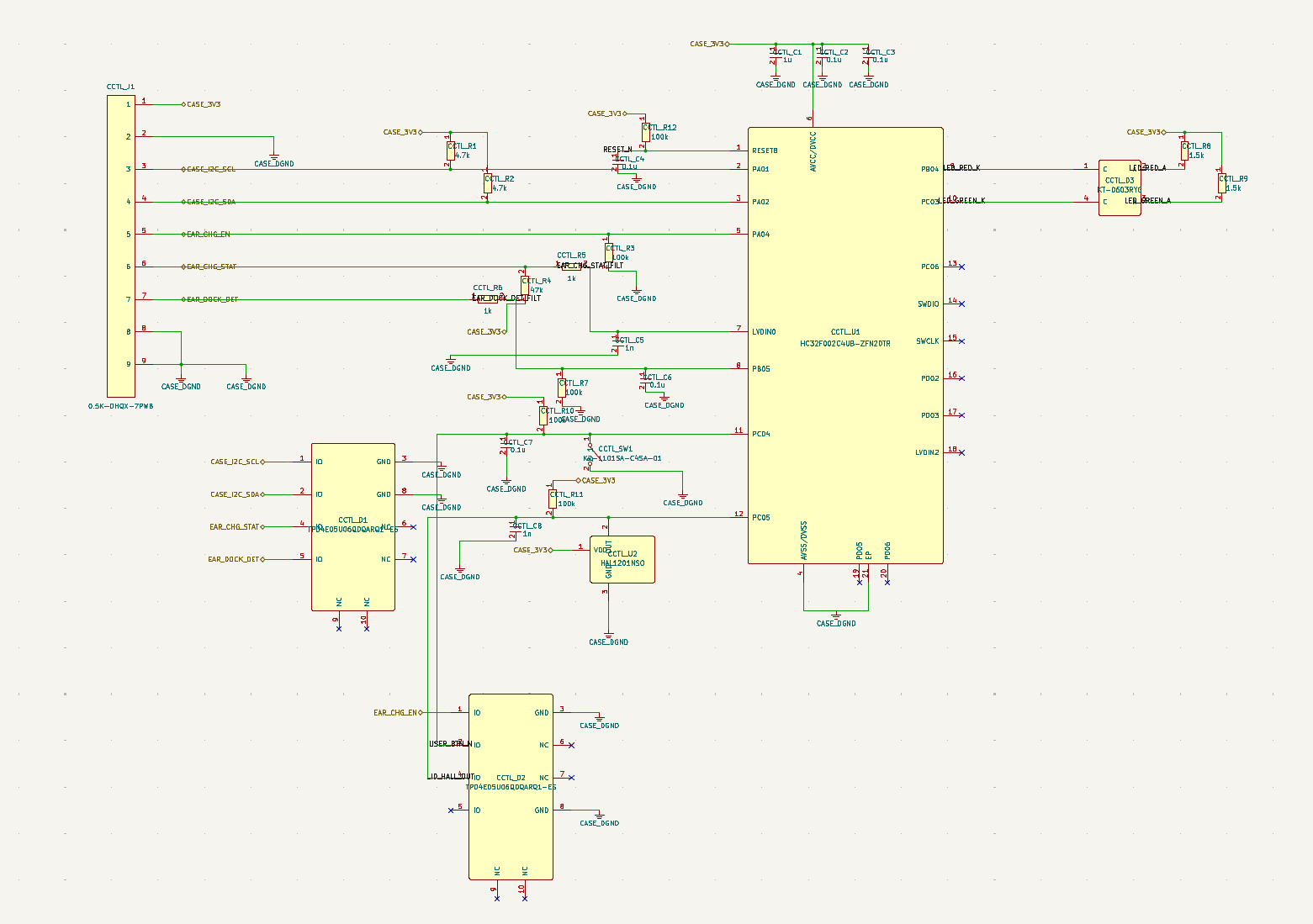
The control sheet turns the charging case from a passive battery holder into an interactive subsystem. It can detect dock status, enable or disable earbud charging, read status lines, communicate over I2C, and drive visible red/green indicators.
This section should be reviewed for firmware-state behavior as much as electrical connectivity. For example, the case logic needs clear rules for when an earbud is inserted, when charging is allowed, what happens if the dock pins bounce, and how LED states map to real charge or fault conditions.
Earphone Module
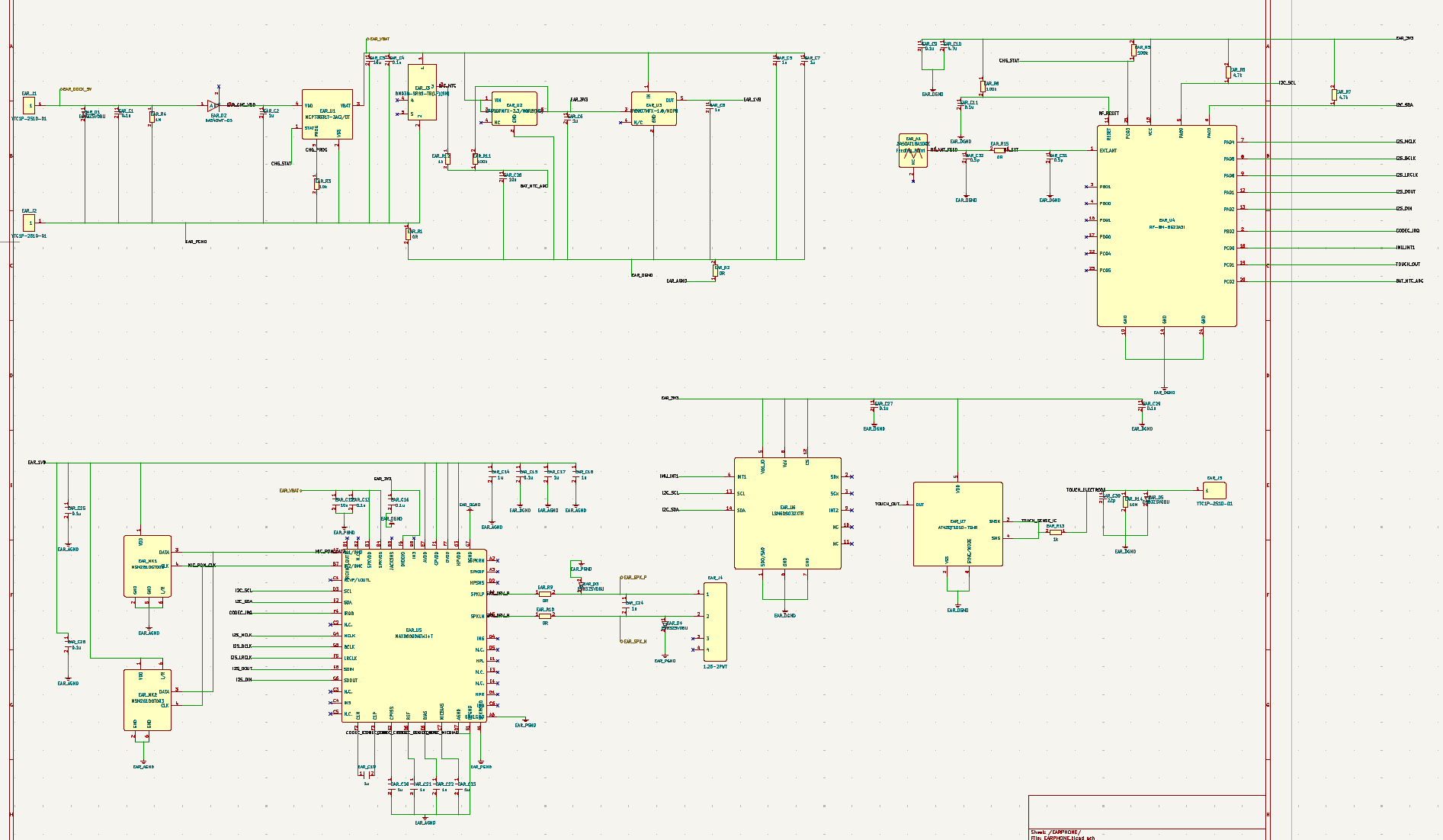
The earphone module is where the prompt’s most ambitious features would need to be proven. The schematic capture includes the kinds of building blocks a TWS earbud needs, but the current asset package does not prove a finished ANC or spatial-audio implementation. Those features depend on microphone placement, acoustic chamber design, DSP/codec support, latency, firmware, calibration, and paired-earbud synchronization.
For this module, the most important review questions are:
- Does the audio controller or codec actually support the required ANC and spatial-audio signal chain?
- Are the microphone inputs, biasing, grounding, and physical placement suitable for feedforward or feedback ANC?
- Are speaker-driver outputs, impedance assumptions, and protection circuits compatible with the selected transducer?
- Can the battery and regulators support peak wireless/audio processing current without audible artifacts?
- Are RF, antenna, touch, microphone, and speaker areas isolated well enough for a compact earbud PCB?
BOM Preview
The included BOM contains 64 line items and 156 placed quantities. It provides a concrete starting point for sourcing, cost estimation, package and footprint validation, and manufacturing review, while the placed but unrouted PCB file exposes the next layout work.
A production-oriented BOM pass should add:
- Exact manufacturer part numbers and approved alternates.
- Package, footprint, and land-pattern verification.
- Battery, USB-C, charger, regulator, audio, microphone, speaker, and touch-interface specifications.
- Availability, lifecycle, and cost checks.
- Safety, compliance, and certification-relevant component notes.
What Still Needs Human Review
This project is intended as a first engineering draft. Before treating it as a product design, the TWS earbuds and charging case should be reviewed for:
- Battery charging safety, thermal behavior, current limits, protection circuits, and fault handling.
- USB-C input protection, ESD, reverse-current behavior, and connector robustness.
- Earbud dock-contact reliability, insertion/removal debounce, corrosion risk, and short-circuit behavior.
- Audio signal integrity, microphone noise floor, speaker drive, ground return, and isolation from switching regulators.
- ANC and spatial-audio feasibility across hardware, firmware, DSP, microphone placement, latency, and acoustic tuning.
- RF performance, antenna clearance, coexistence, and enclosure effects.
- Mechanical fit for batteries, speaker, microphones, dock contacts, touch interface, and the charging case.
- Firmware state machines for pairing, charging, dock detection, LED feedback, battery reporting, and fault recovery.
- Compliance planning for Bluetooth, EMC, battery transport, charging safety, and consumer audio regulations.
- Production work still required: BOM and footprint validation, PCB placement review and routing, firmware, test plan, acoustic and RF validation, compliance review, and manufacturing notes.
Related SpeedUp Projects and Guides
- How to Review an AI-Generated KiCad Schematic
- AI Circuit Schematic Generator: Prompt to Reviewable Hardware Draft
- Battery-Powered Sensor Circuit Design Checklist
FAQ
Is this TWS earbuds design production ready?
No. This is a first engineering draft for review. It shows a useful architecture and schematic direction, but it still needs component validation, PCB layout, firmware, acoustic testing, compliance work, and manufacturing review before it can be considered production ready.
What files are included in the generated package?
The ZIP includes TWS_earphone.kicad_pro, TWS_earphone.kicad_sch, the three hierarchical sheets, TWS_earphone.kicad_pcb, a 64-line-item / 156-placed-quantity BOM in CSV and XLSX formats, 18 symbol libraries, 32 footprint files, and prompt, block-diagram, and top-level-schematic images.
Does the schematic prove automatic noise cancellation and spatial audio?
Not by itself. The prompt requested automatic noise cancellation and spatial audio, and the generated earphone module includes audio and microphone-related circuitry, but those features require hardware selection, microphone geometry, firmware, DSP, calibration, latency testing, and acoustic validation.
Can this project be opened directly in KiCad?
Yes. Open TWS_earphone/TWS_earphone.kicad_pro in KiCad 10. The source package includes project-level symbol and footprint tables; the PCB file has 156 placed footprints but no routed copper segments or vias, so routing and layout validation remain downstream work.
What should engineers review first?
Start with charging-case safety and earbud dock behavior, because battery charging and dock-contact faults can create product-level risk quickly. After that, review audio and ANC feasibility, RF layout constraints, mechanical packaging, component selection, and the production BOM.
Can I generate a similar device from my own prompt?
Yes. SpeedUp can turn a natural-language hardware idea into structured engineering artifacts that engineers can review, refine, and turn into a more complete schematic or PCB workflow.
Download the TWS Earbuds KiCad Source
Download the TWS earbuds KiCad source
Use this TWS earbuds ZIP as a review starting point for the generated editable KiCad project. It includes the project and schematic source, three module sheets, a placed but unrouted PCB file, BOM exports, local symbol and footprint libraries, and project-evidence images; complete and validate PCB placement and routing, firmware, mechanical and acoustic design, RF tuning, battery and charging tests, compliance work, production tests, and manufacturing files before treating it as a complete engineering handoff.
Create Your Own TWS Earbuds Project
Turn your own TWS earbuds and charging-case brief into reviewable engineering artifacts.
Use SpeedUp to generate structured schematic sheets and an editable KiCad project for engineering review. Create a free account to begin.